World slices and heightmaps
Introduction
The standard way to obtain information about the Minecraft world is through
Editor methods like Editor.getBlock() and
Editor.getBiome(). However, there is one alternative way to read the
world that can be more useful depending on the circumstance: the
WorldSlice class.
A WorldSlice object is a read-only snapshot of a box-shaped “slice” of
the world, which GDPC obtains by requesting a single large batch of raw world
data from the GDMC-HTTP interface and then parsing it internally.
World slices take a while to load, but accessing data from them is very fast.
World slices serve two purposes:
Improved performance.
World slices can massively improve performance when reading many blocks or biomes in a fixed area.Under the hood, GDPC’s direct world reading functions (like
Editor.getBlock()) normally use a separate HTTP request for each call. If you’re reading a lot of data from a fixed area (such as the build area), the time cost of loading a world slice can be much less than than the time cost of multiplegetBlock()calls.Note
Editor.placeBlock()calls can also take a lot of time, but methods to optimize those will be described later, in Overview - Building shapes and Overview - Improving Editor performance.Heightmaps.
World slices provide access to multiple heightmaps, which can be very helpful when building on the world surface.
Loading a world slice
There are two ways to load a world slice:
With
Editor.loadWorldSlice()(which returns aWorldSlice). This is the recommended method.By directly constructing a
WorldSliceobject.
Using Editor.loadWorldSlice() is recommended in most cases, because it has
some features that direct construction doesn’t have:
It uses stored settings from the
Editorobject (such as the GDMC HTTP host URL) instead of taking them as parameters.It loads the build area if no area is specified.
It can optionally store the loaded world slice in the
Editorto act as a “backing cache” for block and biome retrieval (this will be explained in Overview - Improving Editor performance), which also makes it available asEditor.worldSlice.
In both cases, the first parameter (a Rect object) specifies which area of the
world to load. World slices always contain all blocks from the lowest Y-level to
the highest Y-level, so only the XZ-rectangle needs to be specified.
Some examples of how to load a world slice of the build area:
from gdpc import Editor, WorldSlice

editor = Editor()

# 1. Load a WorldSlice with Editor.loadWorldSlice()
worldSlice = editor.loadWorldSlice() # Loads the build area by default

# 2. Specify the area to load explicitly
buildArea = editor.getBuildArea()
buildRect = buildArea.toRect() # Converts a 3D Box to its XZ-rect
worldSlice = editor.loadWorldSlice(buildRect)

# 3. Store the WorldSlice in the Editor
editor.loadWorldSlice(buildRect, cache=True)
# The WorldSlice will now act as a block and biome cache (explained later), and
# become available as editor.worldSlice.
# An Editor can only store one WorldSlice at a time.

# 4. Construct a WorldSlice directly
worldSlice = WorldSlice(buildRect) # Specifying the area is required in this case
Getting blocks and biomes
The WorldSlice class has several functions for accessing its contents. For
each type of data, there is both a local and a global accessor variant. For
example: WorldSlice.getBlock() and WorldSlice.getBlockGlobal(). The
local variants interpret coordinates as relative to the specified XZ-rect (so
(0,0,0) is the first position in the slice), while the global variants
interpret coordinates as relative to the world origin (so (0,0,0) may or may
not be in the slice).
If a block or biome is requested that is not contained in the slice,
the return value will be Block("minecraft:void_air") / "" respectively.
Some examples:
from gdpc import Editor, Rect

rect = Rect((2,2), (5,5)) # Rect with corners (2,2) and (6,6)

editor = Editor()
worldSlice = editor.loadWorldSlice(rect)

# Get the block and biome at local (X,Z)=(3,64,3) / global (X,Z)=(5,64,5).
block = worldSlice.getBlock((3,64,3))
biome = worldSlice.getBiome((3,64,3))

# Get the block and biome at global (X,Z)=(3,64,3) / local (X,Z)=(1,64,1).
block = worldSlice.getBlockGlobal((3,64,3))
biome = worldSlice.getBiomeGlobal((3,64,3))

# Get Block("minecraft:void_air"), since this position is not in the slice.
block = worldSlice.getBlock((6,64,6))
There are more accessors besides the ones for blocks and biomes. Refer to the API Reference for the full list.
Getting and using heightmaps
Minecraft internally keeps track of several heightmaps: 2D arrays that contain the Y-height at each XZ-location, for various definitions of “height”. At the time of writing, there are four types:
WORLD_SURFACE
Heights of the top non-air blocks.MOTION_BLOCKING
Heights of the top blocks with a hitbox or fluid.MOTION_BLOCKING_NO_LEAVES
LikeMOTION_BLOCKING, but ignoring leaves.OCEAN_FLOOR
Heights of the top solid blocks.
The WorldSlice class provides access to these heightmaps via
WorldSlice.heightmaps, in the form of a dictionary of 2D
numpy arrays. Note that the arrays should be
indexed with local coordinates: index [0,0] corresponds to the start of the
world slice rectangle, not the world origin.
Warning
The heightmap values are actually always one higher than what the descriptions from the Minecraft wiki would suggest. GDPC does not correct for this; it simply provides the heightmaps as they are stored by Minecraft.
Example of reading a value from a heightmap:
from gdpc import Editor, Rect

rect = Rect((2,2), (5,5)) # Rect with corners (2,2,2) and (6,6,6)

editor = Editor()
worldSlice = editor.loadWorldSlice(rect)

height = worldSlice.heightmaps["WORLD_SURFACE"][3,3]
# `height` now contains the Y-coordinate of the highest non-air block (plus 1)
# at local (X,Z)=(3,3) / global (X,Z)=(5,5).
Note
You may wonder why there is no direct heightmap reading method akin to
Editor.getBlock() and Editor.getBiome(). The reason is that, when world
slices were added to GDPC, there was no way to directly request heightmaps
from the GDMC HTTP interface — heightmaps could only be obtained by
requesting and parsing raw world data.
Starting from version 1.3.2, the GDMC HTTP mod does actually support directly
requesting heightmaps, so a direct heightmap reading function may be added to
GDPC in the future.
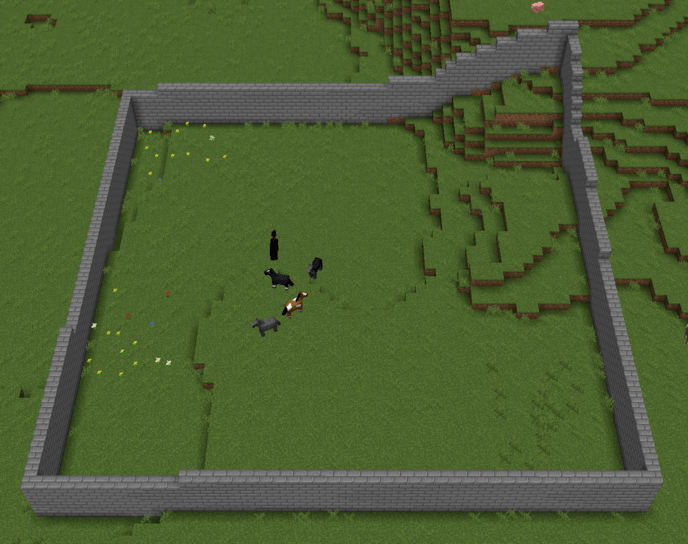
Heightmaps can be very useful when writing generative algorithms that need to adapt to the pre-existing terrain. For example, the following snippet uses heightmaps to build a wall around the perimeter of the build area that follows the curvature of the ground:
from gdpc import Editor, Block

editor = Editor()
buildArea = editor.getBuildArea()
buildRect = buildArea.toRect()
editor.loadWorldSlice(buildRect, cache=True)
heightmap = editor.worldSlice.heightmaps["MOTION_BLOCKING_NO_LEAVES"]

# Loop through the perimeter of the build area
for point in buildRect.outline:
    localPoint = point - buildRect.offset

    # You can index a numpy array with a pyGLM vector by converting to a tuple
    height = heightmap[tuple(localPoint)]

    for y in range(height, height + 5):
        editor.placeBlock((point[0], y, point[1]), Block("stone_bricks"))
Possible result: